





Listed in Roadwurx Features
Every road department, no matter its size, needs one reliable place to track essential information about the roads it maintains. Paper notebooks, spreadsheets, and scattered files all fall short, especially when you’re trying to answer questions from the town board, justify a paving budget, or simply remember when a particular road was last worked on. That’s why the Roadwurx Roads module is designed as a clean, comprehensive, and easy-to-use hub for every detail you need to store about your roads.
At its core, the module gives you a simple starting point: to add a road, all you need is its name and owner. From there, you can enter as much or as little detail as you have available. Roadwurx never forces you into fields you don’t use. Instead, it offers a structured space where information can grow over time, just like your assets themselves.
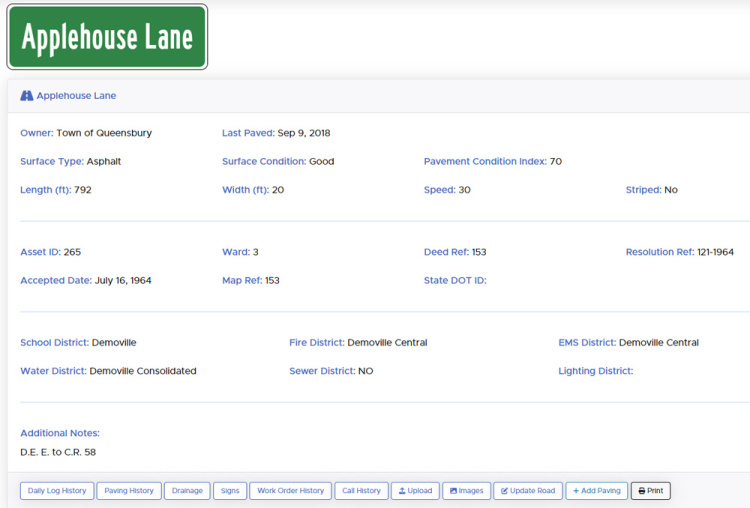
Once you begin documenting your roads, you can store data such as length, width, ward, pavement condition index (PCI), surface condition, speed limit, striping details, and surface type, whether it’s asphalt, chip seal, concrete, gravel, dirt, or anything in between. You can also record district information - fire, EMS, water, sewer, lighting, and school - giving you instant context when coordinating with other agencies. For departments with more formal documentation needs, the module includes fields for resolution numbers, deed references, map numbers, asset numbers, and ownership details, whether the road belongs to the town, county, state, or another entity.
The Roads module also makes it easy to track when a road was formally accepted, ensuring you maintain accurate historical records. Image uploads allow you to attach snapshots, sketches, or written observations directly to the road’s record, creating a long-term memory that your department can rely on, even as staff changes over the years.
Viewing your road data is effortless. You can scroll through your road list or simply start typing into the auto-suggest search bar to jump directly to the road you need. From there, updating information is as easy as clicking “Edit.” Whether a road is repaved, reclassified, or inspected, your records stay current with just a few quick changes.
What truly elevates the Roads module, however, is what sits just below the data panel: a powerful toolbar that ties each road to the rest of your department’s work. With a single click, you can see every phone call related to that road, along with all associated work orders. You can open its entire paving history, review a list of daily activity notes, inspect its signage inventory, or view all stormwater installations located along that road. This interconnected view transforms each road from an isolated entry into a living history of your department’s operations.
With the Roads module, your team isn’t just storing road names and measurements - you’re building a complete picture of your network, your workload, and your priorities. It becomes easier to plan paving schedules, defend your budget, respond to resident questions, and maintain continuity as staff members join or retire. Most importantly, it gives your department confidence that every road in your care is documented clearly, accurately, and in one place.